Welcome GLM & SLM Data Visualization Early Adapters!





We are so glad you're here!
We wanted to create a public space for everyone trialing the Data Visualization tool to connect and share lessons learned, thoughts, questions, and resources.
What to share here:
- Tips and tricks you've discovered
- Creative use cases or applications
- Questions about features or functionality
- Feedback on what's working well (or what isn't)
- Resources like templates, datasets, or tutorials
- Screenshots of interesting visualizations you've created
To kick us off, here are some resources:
- Check out the Data Visualization Learning Center training course
- Support Hub Articles
- Compass Post: GLM/SLM Fundamentals Webinar - What to Know About the New Data Visualization Tool Coming Soon
- Webinar: GLM/SLM Fundamentals Webinar - Preparing for the data visualization tool
Getting started:
- New to the tool or Compass? Check out our FAQ page and feel free to introduce yourself and share what you're hoping to accomplish
- Already experimenting? We'd love to see what you're building!
We'll be monitoring this space regularly to answer questions and incorporate your feedback into future updates. Looking forward to seeing what insights and innovations emerge from this group!
Comments
-
When I click to get on the training course, my login says it is invalid.
"not supported"Not sure how to proceed
0 -
Thanks! Excited to dive in and play around with the tool!
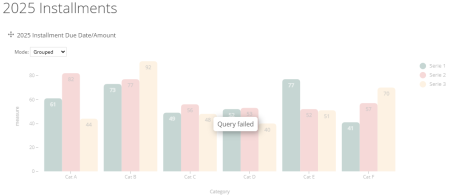
Quick question - earlier this morning I built a few dashboards that were populating data, but now when I try to build a new dashboard (or go back into the ones I already built) I'm getting a "Query failed" error. Is this happening to anyone else, or is there something you'd recommend I do to troubleshoot?
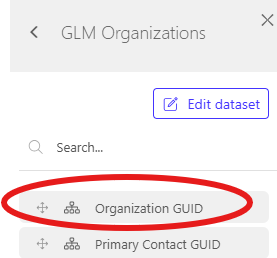
Additionally, I was trying to understand what the "GUID" fields are within various datasets. I don't see anything regarding "GUID" in the glossary or support articles. Is that something we'll go over at some point?
Thanks!
1 -
Hi Everyone!
We're so excited to have you join us in the early adopter program.
Known Issue Update: I just posted this in the system, but wanted to share it here as well. We're aware of the "Query Fail" message that Conner mentioned above.
Conner - no troubleshooting needed on your end. All Early Adopter sites are currently being impacted by this issue. Our engineering team is working to resolve it as quickly as possible.
I'll update everyone here when we're ready for you to jump back in!
Thank you all for your partnership on this new functionality.
Best,
Sammie
8 -
@LisaDiehl looks like we might have a couple of emails for your account. Guessing that's the reason. I'll reach out to you separately and we can figure it out. If anyone else runs into issues accessing the course, reach out to the rest of our team in support@foundant.com!
0 -
HI All!
Everything should now be working again with Data Visualization.Best
sammie
2 -
Yay! I'm in the tool and coming up with lots of questions. But for now, a few thoughts on page layout/functionality: The Data Sets sidebar:
- when switching dashboards (say Evaluation to Approvals), the sidebar doesn't automatically refresh to match, giving me errors when I try to add things.
- Search function - if it could stay visible when scrolling down, that would be helpful.
- for date fields (create date, last modified date) with a ton of options, could those be collapsed by default, and when clicked on, pop up?
- Make the sidebar width adjustable. Some field names are longer and can't be read.
Can't wait for training next week. -Amy
2 -
I see the list of training events - is the plan that you want us to attend all of them in order or just pick one from the list?
0 -
Great question @JoleneWillis! For the webinar tomorrow, please attend if you can. If not, don't worry, we'll email you the recording afterward.
For the hands-on training sessions, you can choose whichever workshop fits best with your schedule. These are designed to give you practical experience and dedicated time to ask specific questions as you dive into this tool, so pick the one that works for you.
1 -
Question: I built an Applications Dashboard, and included a process filter. It looks great! But I created a pivot table to show request statuses by process, and although I think I did ok, the data in the table doesn't seem to be populating correctly. (For ex, August 2025 flash shows: 1 follow up submitted, 8 follow up draft and 13 denied. Actually, I have 9 in follow up draft (I've verified I have no follow ups submitted across all processes) and 30 denials.) I don't see what I've done wrong!
0 -
HI @AmyBonner if you send this to our support team, we can do some digging on whether it is a configuration issue or potentially a data issue.
0 -
thanks Sammie - normal support or is there a special team for the early adopters group?
0 -
@AmyBonner normal support can help! (support@foundant.com)
0 -
Hi Everyone! If you're looking for the recording to the 9/23 webinar, you can find it and the workshop sign-up links here:
2 -
Does anyone have examples of setting targets or tracking progress towards goals?
I've tried budget targets but would love to see other examples.
0 -
Your budget targets dashboard looks great. Could you create and share a brief clip on how you created that?
1 -
Thanks to everyone that joined us yesterday for the Data Visualization webinar for Early Adopters Round 2! We are looking forward to having you get into the system and build new things! HERE is the link to the Compass post with the slides and the recording. Feel free to take a look at the tips & tricks shared above.
Sydney Murrell
Client Success Manager
Foundant Technologies
3 -
Hi!
So far loving the new data visualization tool. I know the new field grouping feature is coming (can't wait!), but I have a question.
We have been with GLM for 10+ years, so we have a lot of processes and fields in the system. Is there any way to filter by process first? For example, we revamped our process in 2024, so I know I only want to look at processes 2024 - present. This would also help with field selection.
1 -
Hi @VondaCarr , that's so good to hear!
Regarding your question, I think your best option when you create your dashboard will be to add a filter by process. That being said, there is no way to filter the field selection list at this time. I would recommend relying on the search box at the top of that list.1 -
@MariusDereskevicius Thank you for a quick response!
That is what I have been doing. I really want to be lazy and make it think for me.
2