How to share with team members?



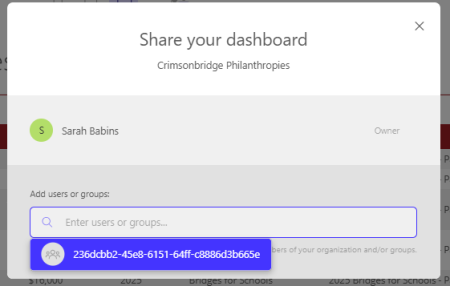
Hi everyone, so excited to have finished setting up my first data visualization dashboard in Foundant GLM! Now I'm ready to share it with some internal team members who are either Admin or Grants Manager users, but when I search for their name in the "Share" function (by clicking on "Dashboard," then "Share") their names don't pull up. Anyone have any suggestions for me?
Thank you so much! - Sarah Babins, Crimsonbridge Foundation
Best Answers
-
The team member has to visit the Data Visualization page once before their name will show up as being available to share dashboards with.
6 -
You can even proxy in as that individual and as soon as you open a new dashboard, next time you go to share your dashboard, their name will appear.
My guess is that we will continue to explore and elaborate on this as we continue to roll it out for everyone.Marius
Client Success Consultant at Foundant
0








Answers
-
The team member has to visit the Data Visualization page once before their name will show up as being available to share dashboards with.
6 -
You can even proxy in as that individual and as soon as you open a new dashboard, next time you go to share your dashboard, their name will appear.
My guess is that we will continue to explore and elaborate on this as we continue to roll it out for everyone.Marius
Client Success Consultant at Foundant
0 -
Yes! Thank you so much! This was very helpful. I proxied in as them, viewed the Data Visualization - and now I can see them as users. :) I appreciate y'all!
0
