Approval Data Set has multiple Amount Awarded fields





Hello, I am working on an Historic Investment Dashboard (12 years worth of processes). I am adding from the Approval Data set and see quite a few Amount Awarded, and Amount/Grant Amount Requested fields. I’ve tried to create derived columns with no luck.
It was mentioned that support could help relink these duplicate fields. The other option would be to add a filter since we only compare the last 4 years.
What would be the best way to proceed?
Answers
-
Hi @melissamarudas that's a great question and typically with something like Amount Awarded, you would only see one option across all the approval forms. So long term that would be something our support team should look into for you. There may be some Amount Awarded fields "out of sync".
When creating a derived column using something like the "Concatenate" function you'll want to select data types that cannot be used in aggregate functions. For example, data types with this icon next to them: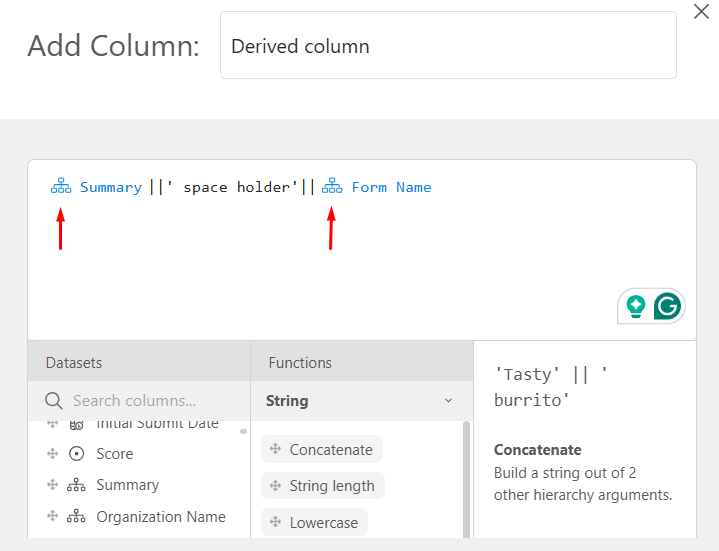
Temporarily, what I would recommend is using a formula and then adding the new column in a pivot table instead of a regular table. The theory behind this is that if you have one row of data per request, you will have either one Amount Awarded and the other will be 0 or a null value, and then another request might have the opposite. And the reason for the pivot table is that the tool does not allow you to add the newly created column to the regular tables. Here is my example:
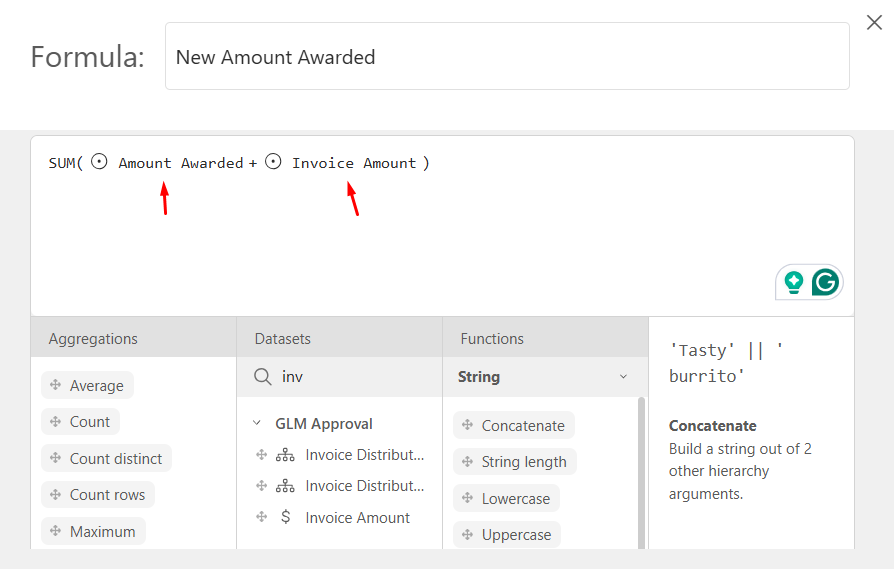
And here it is in a pivot table: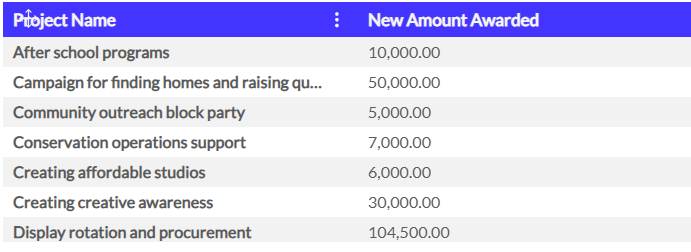
Bottom line: I would reach out to the support team so we can figure out why you have so many duplicate amounts awarded fields. For now, use the formula function to work with numerical data.0 -
@susannefalen here's an example of the same issue we are encountering. I need to look more closely, but I think the solution proposed here doesn't work because some of our duplicate fields had data in both of them (so the pivot table calculation proposed would result in an incorrect total.)
2